<?xml version="1.0" encoding="utf-8"?><feed xmlns="http://www.w3.org/2005/Atom" ><generator uri="https://jekyllrb.com/" version="3.10.0">Jekyll</generator><link href="https://lysec.dev/feed.xml" rel="self" type="application/atom+xml" /><link href="https://lysec.dev/" rel="alternate" type="text/html" /><updated>2026-05-07T18:12:22+00:00</updated><id>https://lysec.dev/feed.xml</id><title type="html">Ly-sec’s Blog</title><subtitle>This is my blog. I write about everything linux related.</subtitle><entry><title type="html">The Dependency Question</title><link href="https://lysec.dev/blog/dev/2026/04/08/dependency-question.html" rel="alternate" type="text/html" title="The Dependency Question" /><published>2026-04-08T00:00:00+00:00</published><updated>2026-04-08T00:00:00+00:00</updated><id>https://lysec.dev/blog/dev/2026/04/08/dependency-question</id><content type="html" xml:base="https://lysec.dev/blog/dev/2026/04/08/dependency-question.html"><![CDATA[<h1 id="the-dependency-question">The Dependency Question</h1>

<p>When I started working seriously on noctalia-shell, one of the first decisions I had to think about was dependencies. Not in the abstract, philosophical sense, but in a very practical one: what does this project actually need to pull in, and what does that cost?</p>

<p>Most desktop shell projects today are built on top of either Qt or GTK. This makes a lot of sense. Both toolkits are mature, well-documented, and solve a huge range of problems out of the box - rendering, input handling, accessibility, theming. If you want to ship something quickly that looks and behaves consistently across setups, reaching for one of them is a reasonable choice.</p>

<p>But there is a cost that does not always get talked about.</p>

<hr />
<h1 id="what-a-heavy-dependency-actually-means">What a heavy dependency actually means</h1>

<p>When your project depends on Qt or GTK, you are not just depending on a library. You are depending on a runtime, a theming system, a set of version assumptions, and in many cases a particular ecosystem’s release cadence. For end users, this often means pulling in a significant chunk of software just to run your shell.</p>

<p>For something that wants to sit close to the system - something that loads early, runs persistently, and should feel lightweight - that weight is worth questioning. A shell component is not an office suite. The closer something lives to the core of the desktop, the more I think it is worth asking whether its dependencies are proportionate to what it actually does.</p>

<hr />
<h1 id="the-practical-side-of-a-leaner-approach">The practical side of a leaner approach</h1>

<p>Building without a large toolkit dependency means a few things in practice. You need to handle more yourself. Rendering, layout, input, compositor communication - things that Qt or GTK abstract away become your responsibility or require more focused, smaller libraries. That is more work upfront.</p>

<p>The tradeoff is that the result can be genuinely leaner. Faster to start, smaller on disk, easier to reason about at the system level. No theming engine to fight with. No version mismatch between your dependency and whatever the user has installed. The surface area of what can go wrong shrinks considerably.</p>

<p>Whether that tradeoff is worth it depends entirely on what you are building and what you value. For a full desktop environment, probably not. For something more focused, it starts to make a lot more sense.</p>

<hr />
<h1 id="no-ideology-just-tradeoffs">No ideology, just tradeoffs</h1>

<p>I want to be clear that this is not a critique of Qt or GTK. Both projects are genuinely impressive and have enabled a huge amount of Linux desktop software that would not exist otherwise. For a lot of projects, they are the right answer.</p>

<p>But I think it is worth having the conversation openly, especially as Wayland matures and more people are building compositor-adjacent tools from scratch. The ecosystem is young enough that we are still figuring out what the right defaults are. Not every tool needs to carry the same weight.</p>

<p>noctalia-shell is something I think about in that context. More on where it is heading eventually.</p>

<p><em>Posted on April 8, 2026.</em></p>]]></content><author><name></name></author><category term="blog" /><category term="dev" /><summary type="html"><![CDATA[The Dependency Question]]></summary></entry><entry><title type="html">From Void to Gentoo: A Shift in Workflow</title><link href="https://lysec.dev/blog/distro/2026/01/22/from_void_to_gentoo.html" rel="alternate" type="text/html" title="From Void to Gentoo: A Shift in Workflow" /><published>2026-01-22T00:00:00+00:00</published><updated>2026-01-22T00:00:00+00:00</updated><id>https://lysec.dev/blog/distro/2026/01/22/from_void_to_gentoo</id><content type="html" xml:base="https://lysec.dev/blog/distro/2026/01/22/from_void_to_gentoo.html"><![CDATA[<h1 id="from-void-to-gentoo-a-shift-in-workflow">From Void to Gentoo: A Shift in Workflow</h1>

<p>On October 29th, I wrote about my fresh start with Void Linux. I had been using Void for a while and genuinely enjoyed it. The system is clean, runit is refreshingly simple, and xbps is insanely fast. For general use, Void is fantastic: lean, stable, and predictable.</p>

<p>After several months though, I decided to switch to Gentoo. The reason was not philosophical or emotional. It was practical. My current workflow started to lean more toward newer software than Void is designed to provide by default.</p>

<hr />

<h1 id="the-practical-limitation">The practical limitation</h1>

<p>My work on <strong>noctalia-shell</strong>, which is based on <strong>Quickshell</strong>, requires reasonably up-to-date Qt versions. While Void does eventually ship newer Qt releases, the delay compared to upstream sometimes meant waiting longer than I was comfortable with during active development.</p>

<p>In addition to that, I regularly test noctalia-shell across multiple compositors. Many of these compositors, especially newer or rapidly evolving ones, benefit from newer toolchains and system libraries. When getting newer GCC versions or certain libraries required extra effort, testing started to feel more cumbersome than it needed to be.</p>

<p>At that point, it became clear that my needs had shifted.</p>

<hr />

<h1 id="why-gentoo-fits-now">Why Gentoo fits now</h1>

<p>The conclusion was straightforward: if I am already compiling and tweaking parts of the system, it makes sense to use a distribution that embraces that workflow.</p>

<p>With Gentoo and the <code class="language-plaintext highlighter-rouge">~amd64</code> (testing) profile, I get:</p>

<ul>
  <li>Earlier access to newer Qt releases for QuickShell development</li>
  <li>More recent toolchains like GCC for compositor testing</li>
  <li>A modern graphics stack that many compositors rely on</li>
</ul>

<p>Portage gives me fine-grained control over versions, USE flags, and dependencies. I can ensure that noctalia-shell and everything it depends on is built against the versions I want, without working around a fixed release cycle.</p>

<hr />

<h1 id="no-hard-feelings-just-different-needs">No hard feelings, just different needs</h1>

<p>This is not a criticism of Void Linux. Void does exactly what it sets out to do, and it does it very well. For a lot of use cases, and for where I was before, its stability and simplicity are real strengths.</p>

<p>For my current projects though, I value being able to adjust quickly when upstream changes. Gentoo makes that easier for me right now.</p>

<p>Void taught me a lot about simplicity and service management. Gentoo is teaching me about optimization and system-level flexibility. Different tools for different stages.</p>

<p><em>Posted on January 22, 2026.</em></p>]]></content><author><name></name></author><category term="blog" /><category term="distro" /><summary type="html"><![CDATA[From Void to Gentoo: A Shift in Workflow]]></summary></entry><entry><title type="html">Living Between Code and the System</title><link href="https://lysec.dev/blog/personal/foss/2026/01/22/living_between_code_and_the_system.html" rel="alternate" type="text/html" title="Living Between Code and the System" /><published>2026-01-22T00:00:00+00:00</published><updated>2026-01-22T00:00:00+00:00</updated><id>https://lysec.dev/blog/personal/foss/2026/01/22/living_between_code_and_the_system</id><content type="html" xml:base="https://lysec.dev/blog/personal/foss/2026/01/22/living_between_code_and_the_system.html"><![CDATA[<h1 id="living-between-code-and-the-system">Living Between Code and the System</h1>

<p>Noctalia started in July 2025 as my solo project. Shortly after, Ferreo joined and shortly after is the time that Lemmy joined working on Noctalia. This turned into a small team of 2 people who have been putting in ungodly amounts of hours into the project.</p>

<p>Some days, we both end up putting in 12-hour stretches or more, completely absorbed in building, breaking, fixing, and improving things. Everything we do has a purpose that we can see. Noctalia is where we can really work. Open source, creating tools that people actually use, that is where our focus and energy make sense.</p>

<hr />

<h1 id="on-support-and-bureaucracy">On Support and Bureaucracy</h1>

<p>Being in Germany and working on open source projects while relying on state support is… strange. Donations, no matter how small or big, come from people who care - but the system can make even that kind of support more complicated than it should be.</p>

<hr />

<h1 id="why-we-do-this">Why We Do This</h1>

<p>Noctalia is not just something to pass the time. It is precise, tangible, and ours. We can make decisions, see results, and improve things in a way that feels real. We can experiment and push ourselves without anything getting in the way.</p>

<p>Writing about it is not complaining. It is not asking for sympathy. It is simply putting into words what works and what doesn’t, what draws me in, and what makes sense to me. It helps me understand what I am doing and why it matters.</p>

<hr />

<h1 id="code-and-chaos">Code and Chaos</h1>

<p>I will keep working on Noctalia, and alongside Lemmy we continue learning, building, and sharing. I navigate the friction between doing something I love and the systems around me, and that will not stop.</p>

<p><em>Posted on January 23, 2026.</em></p>]]></content><author><name></name></author><category term="blog" /><category term="personal" /><category term="foss" /><summary type="html"><![CDATA[Living Between Code and the System]]></summary></entry><entry><title type="html">Voidlinux - 30 days later</title><link href="https://lysec.dev/2025/11/27/voidlinux_30_days_later.html" rel="alternate" type="text/html" title="Voidlinux - 30 days later" /><published>2025-11-27T00:00:00+00:00</published><updated>2025-11-27T00:00:00+00:00</updated><id>https://lysec.dev/2025/11/27/voidlinux_30_days_later</id><content type="html" xml:base="https://lysec.dev/2025/11/27/voidlinux_30_days_later.html"><![CDATA[<p>Alright so it’s officially been a bit more than 30 days since I wiped my drive and commited to Voidlinux for real.
And honestly? It’s been kind of… uneventful. In a good way.</p>

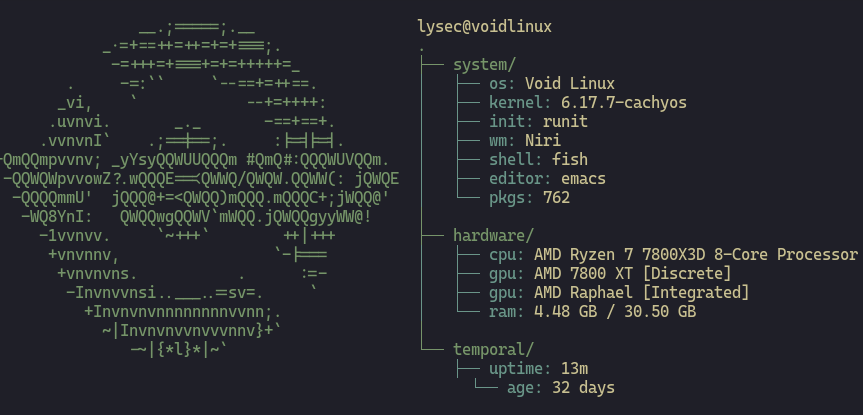
<p>To give you an idea of what I’m working with, here’s my current swiftfetch:</p>

<figure>
  <img src="/assets/images/void-swiftfetch.png" alt="Fastfetch output on Void Linux" width="650" />
  <figcaption>swiftfetch on my Void setup - clean, minimal, exactly how I like it.</figcaption>
</figure>

<p>I thought I’d have at least <em>one</em> dramatic “why did I do this to myself” moment by now - you know, something breaking, a service refusing to start, a package being severely out of date or something else. But nope. Void just kept doing Void things and stayed fully out of my way.</p>

<h2 id="nothing-broke-seriously">Nothing broke. Seriously.</h2>
<p>Yup, I know - it’s boring when stuff just works. But that’s the surprisig part.
Zero issues. No random crashes, no mysterious errors, no “oh right, runit works differently” moments. My day-to-day workflow has stayed exactly the same, just on a system that feels less noisy.</p>

<p>I kept expecting to miss systemd here and there, but as it turns out I didn’t miss <em>anything</em>. No journalctl diving, no unit files, no drama. Runit just does its thing, quietly and calm.</p>

<h2 id="runit-30-days-later">Runit, 30 Days later</h2>
<p>At first runit felt “cutely simple” but after a month it feels <em>correct</em>.
Services are directories with tiny scripts. Want to enable something? Symlink. Done. There is something oddly comforting about that level of transparency.</p>

<p>And you know what the best part is?
It hasn’t annoyed me a single time.
Can’t say that about systemd.</p>

<h2 id="the-cachy-kernel-situation">The Cachy Kernel Situation</h2>
<p>My CachyOS kernel template still performs exactly like it did on Arch (from my limited testing) - which is to say: fast, responsive and very stable.
No weird interactions, no Void specific shenanigans. It just works.</p>

<p>Maintaining it throgh xbps-src has been way smoother than expected too. I kind of enjoy the template workflow now (oh no :p).</p>

<h2 id="the-void-vibe">The “Void Vibe”</h2>
<p>I think the reason Void stuck for me where other distros eventually got on my nerves is pretty simple: <strong>Void does not care what you do, it just gets out of your way</strong>.</p>

<p>It doesn’t assume things for you.
It doesn’t shove anything into the background.
It doesn’t boot with 15 daemons you’ll never use.
It’s just <em>quiet</em>.</p>

<h2 id="will-i-keep-using-it">Will I Keep Using It?</h2>
<p>Yeah.
Void is staying on my drive for the foreseeable future. It’s stable, minimal, and chill - exactly the kind of environment I like working in. No surprises, no nonsense. Just Linux.</p>

<p>I honestly expected the 30-day update to be a rant about something obscure that shattered my sanity. Instead it’s like:</p>

<blockquote>
  <p>“Hey, Void’s cool. Nothing happened.”</p>
</blockquote>

<p>And honestly?
I’m okay with that.</p>]]></content><author><name></name></author><summary type="html"><![CDATA[Alright so it’s officially been a bit more than 30 days since I wiped my drive and commited to Voidlinux for real. And honestly? It’s been kind of… uneventful. In a good way.]]></summary></entry><entry><title type="html">My Voidlinux journey</title><link href="https://lysec.dev/blog/editors/2025/10/29/voidlinux.html" rel="alternate" type="text/html" title="My Voidlinux journey" /><published>2025-10-29T12:00:00+00:00</published><updated>2025-10-29T12:00:00+00:00</updated><id>https://lysec.dev/blog/editors/2025/10/29/voidlinux</id><content type="html" xml:base="https://lysec.dev/blog/editors/2025/10/29/voidlinux.html"><![CDATA[<h1 id="my-voidlinux-journey">My voidlinux journey</h1>
<p>4 days ago I decided to finally run Voidlinux on my main drive. I did try it before, but there were some quirks I couldn’t deal with, so I instantly uninstalled it and went back to CachyOS. However, I decided to give it another try, this time for real.</p>

<hr />

<h1 id="installation">Installation</h1>
<p>The installation went really well. I used the minimal version (network, not local) and created /boot/efi (2GB), swap (34GB) - yes I know, it might be a bit much, but I’d rather be safe than sorry when it comes to hibernation. The rest of my 1TB NVMe is my root partition.</p>

<p>My setup is currently quite barebones, which is exactly what I wanted. For my compositor, I chose niri because I’m very used to it from before (Arch &amp; NixOS). My editor is (doom) emacs - I switched from nvim to it shortly before I switched to void, and had no issues there either :).</p>

<hr />

<h1 id="runit">Runit</h1>
<p>One of the biggest differences coming to Void is the init system. Instead of systemd, Void uses runit, and honestly, it’s refreshingly simple. Runit is basically a lightweight init system that focuses on doing one thing well: managing services.</p>

<p>The main thing you need to know is that services are just directories in /etc/sv/, and each one has a “run” script that tells it how to start. To enable a service, you just symlink it to /var/service/, and runit takes care of the rest. Want to restart something? Just use <code class="language-plaintext highlighter-rouge">sv restart service-name</code>. Need to check status? <code class="language-plaintext highlighter-rouge">sv status service-name</code>. It’s straightforward and fast.</p>

<p>Coming from systemd, it felt weird at first not having all those complex unit files and targets, but after a day or two, I actually prefer how simple and transparent runit is. You can literally read the run scripts and understand exactly what’s happening - no magic involved.</p>

<hr />

<h1 id="kernel">Kernel</h1>
<p>I started with the default kernel, but it was rather old, so I decided to switch to linux-mainline, which was actually really simple. Most people would probably be fine with it, but given I wanted to learn more about kernels and templates (Voidlinux’s version of PKGBUILDs basically), I decided to create a template for the CachyOS kernel. Oh boy, this was a rollercoaster! If I remember correctly, it took around 8 or so compiles of the kernel to get everything working properly - a fun 7 hours of my time!</p>

<hr />

<h1 id="templates">Templates</h1>
<p>Since we’re on the topic of templates, I think now is a good time to talk about my experience with them.</p>

<p>Templates are basically Void’s way of building packages from source. They’re similar to Arch’s PKGBUILDs, but with their own flavor. You have a void-packages repository where all the templates live, and when you want to build something, you use xbps-src to handle the compilation.</p>

<p>The nice thing is that templates support different build_style options - so if you’re building something with CMake, Meson, or GNU configure, you can just specify the build style and xbps-src handles most of the heavy lifting for you. You still need to define dependencies, the version, checksums, and any patches, but the actual build process is pretty streamlined.</p>

<p>Given that I’d created some PKGBUILDs before, it took me a bit to get used to the different names, layout, and just how templates work overall. While it was a bit different, it was surprisingly easy once I got the hang of it. The documentation could be better, but reading existing templates helped a lot.</p>

<hr />

<h1 id="summary">Summary</h1>
<p>While I’ve only been using Voidlinux for 4 days, I have to say it feels VERY nice. The package manager (xbps) is insanely fast too - it just feels really snappy and responsive.</p>

<p>I do have to say that I would not recommend Void for any new Linux user. You need to handle services yourself, and overall it’s a bit more hands-on compared to things like CachyOS that come preconfigured and ready to go. But if you’re comfortable with Linux and want something lean, fast, and transparent, Void is absolutely worth trying.</p>

<p><em>Posted on October 29, 2025.</em></p>

<hr />

<p><strong>Note:</strong> This post will be updated as I continue my Voidlinux journey and learn more about the system.</p>]]></content><author><name></name></author><category term="blog" /><category term="editors" /><summary type="html"><![CDATA[My voidlinux journey 4 days ago I decided to finally run Voidlinux on my main drive. I did try it before, but there were some quirks I couldn’t deal with, so I instantly uninstalled it and went back to CachyOS. However, I decided to give it another try, this time for real.]]></summary></entry><entry><title type="html">(n)vim or Emacs?</title><link href="https://lysec.dev/blog/editors/2025/10/23/nvim_or_emacs.html" rel="alternate" type="text/html" title="(n)vim or Emacs?" /><published>2025-10-23T12:00:00+00:00</published><updated>2025-10-23T12:00:00+00:00</updated><id>https://lysec.dev/blog/editors/2025/10/23/nvim_or_emacs</id><content type="html" xml:base="https://lysec.dev/blog/editors/2025/10/23/nvim_or_emacs.html"><![CDATA[<h1 id="my-first-proper-post">My First Proper Post</h1>

<p>I can already tell you - this will go bad.</p>

<p>I’ve used <strong>Neovim (AstroNvim)</strong> for a while, and recently I decided to give <strong>Doom Emacs</strong> a try.<br />
At first, I thought Emacs would be a “greybeard editor,” something arcane and dated.<br />
I didn’t expect much - until I actually tried it.</p>

<hr />

<h2 id="first-impressions">First Impressions</h2>

<p>To my surprise, Emacs (especially <em>Doom Emacs</em>) feels <strong>surprisingly accessible</strong>.<br />
The overall defaults make sense, and the experience feels coherent in a way I didn’t anticipate.</p>

<p>I also didn’t expect how good <strong>Magit</strong> is.<br />
I’m relatively new to both Git and Vim, and I always assumed Neovim was <em>the</em> choice as an editor and obviously lazygit, since everyone online seems to swear by it.</p>

<p>However, after spending time with Doom, I realized something:<br />
it just <strong>feels more reasonable</strong> to me.
The same goes for <strong>Magit</strong>, it just feels more natural compared to what lazyvim felt like.</p>

<hr />

<h2 id="why-emacs-clicked-for-me">Why Emacs Clicked for Me</h2>

<p>While I can’t explicitly explain <em>why</em>, Doom Emacs feels more natural.<br />
Its defaults, keybindings, and built-in structure make more sense in daily use.</p>

<p>And then there’s <strong>Org mode</strong> - an entire world of its own.</p>

<p>After learning about Org mode, I <em>immediately</em> switched from <strong>Obsidian</strong> (and later <strong>Notesnook</strong>) to it.<br />
Being able to take notes, manage tasks, and write - all inside the same program - feels <em>so</em> good.</p>

<hr />

<h2 id="looking-ahead">Looking Ahead</h2>

<p>There are still tons of things I don’t know about either Neovim or Emacs, and I’m sure people will probably tell me.<br />
In the end, that doesn’t bother me - this is something <strong>I</strong> use every day, so I need to figure out what works best for me.</p>

<hr />

<p><em>Posted on October 23, 2025.</em></p>]]></content><author><name></name></author><category term="blog" /><category term="editors" /><summary type="html"><![CDATA[My First Proper Post]]></summary></entry></feed>